
Audit logging, Next.js SDK, Disable Keys, and more
Audit logging (beta)
We are introducing audit logging for the following events to allow for better tracking of changes to your account:
- Workspace (create, update, delete)
- API (create, update, delete)
- Key (create, update, delete)
- Vercel integration (create, update, delete)
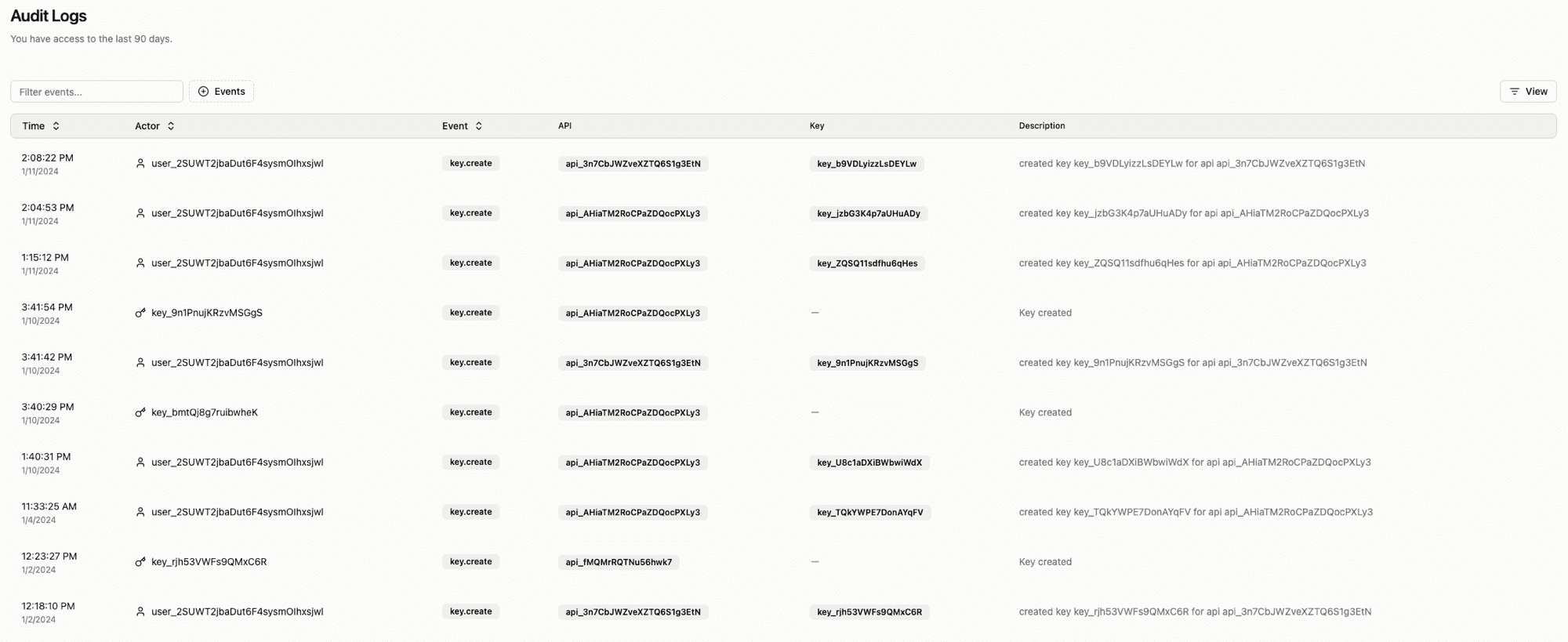
The audit logs are in the dashboard under the Audit logs tab. To access the beta feature, please get in touch with us at info@viraza.net.
Next.js SDK
We are introducing a new SDK for Next.js. The SDK is available as a npm package and can be installed with:
The Next.js SDK gives you a type-safe way to verify API keys, below is an example of how to use the SDK:
Disable Keys
You can now disable a key via the API or in the dashboard. While disabled, the key will act as an invalid key. Suppose you have a customer that has not paid their bill. You may not want to delete the key and wait for the account balance to be current. The key can be disabled temporarily, preventing access until it is enabled.
Examples
We recently moved our examples into their dedicated repository. We have also added a few new examples.
AI Billing example
This example shows how to integrate Viraza and Stripe with an AI application. Below are all the features we included:
- Code to set up Stripe for payment links
- On payment, users are assigned an Viraza API key with the 'remaining' field set to 10, signifying ten credits
- This API key is saved to a cookie (httpOnly, so not accessible via client-side Javascript)
- This cookie is attached to requests to an API route in /api/openai; this API route verifies the key (decrementing remaining) and requests images from OpenAI.
Check it out on Github
CLI Authentication
Adding a CLI to your application is a great way to increase adoption. However, it can be challenging to authenticate users. This example shows you how to use Viraza to authenticate users in your CLI application.
Check it out on Github
Contribution Improvements
The team spent some time removing conflicting type versions and also introducing corepack. Corepack allows us to ensure that when you are contributing, you are using the same version of the dependencies as we are. This should make it easier to contribute to the project.